
Hold Ctrl + Win and speak — it listens.

Let go — it types clean text for you.
Why LikhiBoli?
🇮🇳 Hinglish-native
Pure Hindi → Devanagari, pure English → English, and the natural mix → Roman Hinglish. Automatically.
🔒 Private
Works fully offline. Your recordings are never stored — not on your PC, not anywhere.
🆓 Free
No subscription, no ads, no login. Yours to keep.
⚡ One gesture
No app to switch to. Press-hold the hotkey, speak, release. Works in any app.
Two modes — your choice
| Offline (no key) | Online (free Google key) | |
|---|---|---|
| Privacy | Everything stays on your PC | Audio sent to Google Gemini (your key), never stored |
| English | Good | Great |
| Hindi / Hinglish | Weaker | Excellent |
| Cost | Free | Free |
The app is transparent about this on first run: add a free key for the best Hindi, or skip it and stay fully offline. You can change your mind anytime.
Everything in the tray
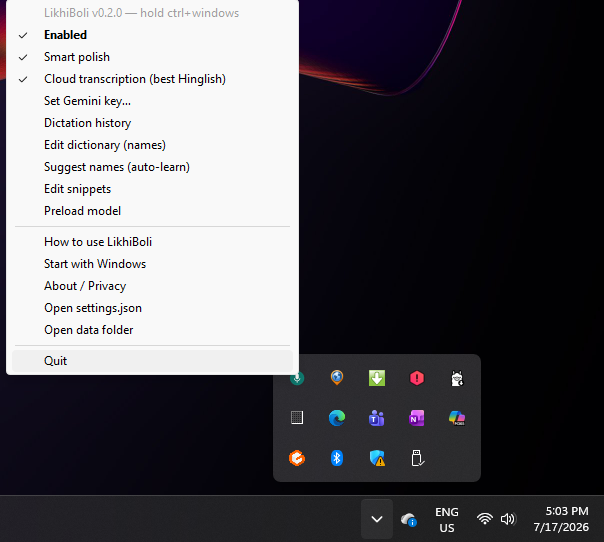
LikhiBoli lives quietly in your system tray. Right-click for history, dictionary, snippets, the key setup, the how-to guide, and more.
Installing (2 minutes)
- Click Download for Windows above. If your browser warns, choose Keep.
- Run LikhiBoliSetup.exe. Windows shows a blue “protected your PC” box — click More info → Run anyway. (This is normal for free, unsigned apps.)
- Accept the short disclaimer and install (no admin password needed).
- On the last screen, set up your free key (recommended) or skip. Done — look for the mic icon in your tray!
First English dictation downloads a one-time speech model (~460 MB, needs internet). After that, offline dictation works with no connection.